English
Lock, set a code, define a schedule: which protocol can say what?
My platform uses Matter to talk to this lock. Does that language limit what I can do? Can I set a code, clear it, give the code a schedule, or find out who came in? Or can I only trigger an opening from a distance?
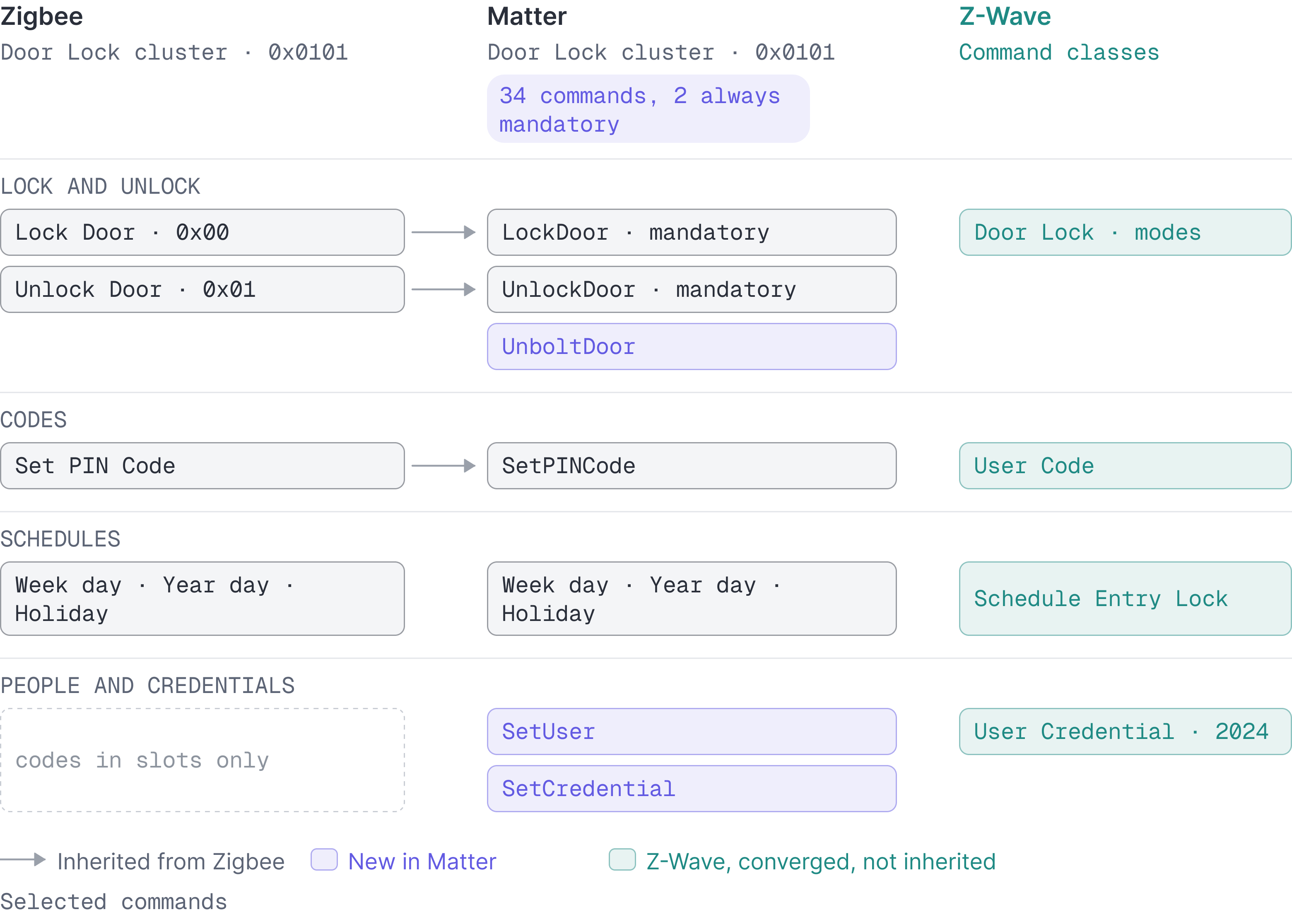
Matter defines thirty-four commands for a door lock. Two of them are mandatory
in every context, LockDoor and UnlockDoor
(Matter 1.4, Door Lock cluster).
The others exist, but they are optional: setting a code, clearing it, fixing a
schedule, reporting who came in. On this protocol, each lock declares for
itself what it agrees to hear. The technical groundwork of these exchanges is
covered in a section of our
article on protocols.
Z-Wave, Zigbee, Matter and Bluetooth do not hold the same dictionary of commands. And in truth, no two of them hold the same.
Three protocols own their language, Bluetooth relays the manufacturer's
Z-Wave, Zigbee and Matter each offer a language of their own, built on a slightly different grammar, but the lock and unlock commands appear in all three dictionaries. Every lock that speaks one of these languages must be able to accept those simple commands.
Matter organises its commands into , numbered blocks of commands and
states that each cover one function. Every command is marked mandatory or
optional. LockDoor and UnlockDoor are the only two that are mandatory with
no condition attached.
Zigbee organises its commands in much the same way, and its lock cluster opens
precisely with Lock Door and Unlock Door, which are given the codes 0x00
and 0x01.
Z-Wave uses no clusters but what it calls command classes, and it works through modes rather than verbs. Where a verb defines an action, "do this", as in "open the door", a mode defines the state of a property, and you pass the state value you want, as in "locking: off". Z-Wave's modes carry a degree of precision the other protocols do not reach.
Bluetooth LE defines none of these commands in a dictionary of its own. It simply carries whatever commands the manufacturer supplies. That approach means both ends of the exchange, the application and the lock, have to speak the same language, which is then defined by the manufacturer who makes both of them. Like Z-Wave, Zigbee and Matter locks, Bluetooth locks do have lock and unlock commands, but they read them in their own brand's language, and that language is entirely unintelligible to a lock of another brand.
Z-Wave has a state for unlocking the inside only, Matter a command for the bolt alone
Among Z-Wave's modes are two states, "Door Unsecured for inside Door Handles" and "Door Unsecured for outside Door Handles", each with a timed variant (Silicon Labs, Door Lock command class).
There is no equivalent to those modes among the other protocols' verbs. None of them can describe the action "open for the person who is inside without opening for the person who is outside".
Matter draws a different line, between the and the latch. That case is the
one European multipoint locks are built for, where the handle and the deadbolt
are two genuinely separate things, as
our article on the two machines explains.
Matter added an optional UnboltDoor command for it, which unlocks the door
without pulling the latch, and an Unlatched state, "Lock state is fully
unlocked and the latch is pulled".
Zigbee and Z-Wave file codes in slots, Matter assigns them to a person
With Z-Wave, adding a code amounts to filling a defined memory slot. "The User Code Set Command used to set a User Code in the device", with a slot number, a status, and a code of four to ten digits (Silicon Labs, User Code).
Zigbee works the same way. Its Set PIN Code command carries a user number, a
status taken from a short list, "available", "occupied and enabled", "occupied
and disabled", a user type, and the code itself
(Zigbee Cluster Library, revision 8).
This still amounts to putting the code in a defined slot: the user number
identifies nobody in particular, it files the code for somebody. A second
Set PIN Code with the same user number overwrites the first. The user number
is, in a sense, a locker number.
Matter kept these commands and added new ones beside them, which no longer
reason in quite the same way. SetUser creates a person, and SetCredential
attaches credentials of different kinds to that person: a code, a card, a
fingerprint, a face. The same person can hold several at once.
So Z-Wave and Zigbee think in terms of talking directly to connected locks, while Matter approaches the same access problem with a management logic closer to the one familiar from access control systems. Z-Wave has since taken the same turn: its 2024 specifications carry a User Credential command class, with users and credentials of several types (Z-Wave Alliance, Silicon Labs).
At Seam we ran into this problem early, having to unify two worlds that do not reason along the same concepts. We solved it by building our access grants (see our first changelog, the documentation and our general page on access management).
The two approaches carry rather different constraints. With codes lodged in slots, the platform has to manage those positions and remember somewhere else which person each one is held for. With the logic of people, it is the credential itself, as it is stored, that names the person it belongs to, which makes it possible among other things to respond differently in different places according to the rights that person holds.
Zigbee hands the code back on request, Matter's user model is more careful
Zigbee's response to Get PIN Code carries four fields, and the last one is
called Code: the lock obediently recites the code it was given, unless its
optional SendPINOverTheAir attribute tells it to mask the digits
(Zigbee Cluster Library, revision 8).
On a lock that keeps a user database, Matter answers differently.
GetCredentialStatus says whether the slot is occupied, and by which person,
but the credential itself is returned only in the very specific context of
Aliro pairing. The lock confirms that a code is there, but it is more careful
about it and avoids saying that secret out loud. For an operator this means
changing a habit: you no longer take stock of a portfolio by reading back the
codes sitting on each door. You can check that a slot is taken, and overwrite
it, but nothing more. A lock that takes codes without a user database still
answers GetPINCode with a PINCode field, as in Zigbee.
Matter's lock cluster carries the same number as Zigbee's
Matter's Door Lock cluster is 0x0101. So is Zigbee's. This is neither a
coincidence nor a convention: the Connectivity Standards Alliance that publishes
Matter is the Zigbee Alliance under another name, and Matter's data model was
built on the cluster library it already owned.
Matter inherited Zigbee's Set PIN Code command, and it kept it as
SetPINCode. Its conformance rule says when that command becomes mandatory:
for a lock that accepts codes without keeping a user database. The two ways of
writing a code therefore coexist inside the protocol, and it is the lock that
declares which one it hears.
Z-Wave was never part of this family. Its command classes were written by another company, for the same locks, and they converged on the same verbs because the locks had the same buttons. In the end it is the hardware that brings the protocols into line.
SmartThings carries access schedules on its Matter driver, not on its Z-Wave one
A code that "works on Tuesday between nine and five" is an entirely different thing from a code that "works".
Matter has three ways of defining a schedule: by day of the week, by day of the year, and for holidays. Each of those ways is optional in its own right, so a lock can perfectly well handle one without having to handle the other two.
Zigbee builds on the same three, under the same names. Z-Wave uses a Schedule Entry Lock command class to do the same job.
All three protocols can therefore carry a schedule. But the protocol is not what sends the commands: between the operator and the lock stands a platform, the application or service they use, and it sends only what has been programmed into it.
SmartThings is one of those platforms, and it publishes the source of its
drivers. The case is a clean one, since the same company writes a driver for
Matter locks and another for Z-Wave locks. The Matter driver announces that it
handles schedules and calls SetWeekDaySchedule. The Z-Wave driver announces
nothing of the kind, and its handler table lists only three command classes,
USER_CODE, NOTIFICATION and TIME
(SmartThings Edge Drivers).
So, as far as the drivers go, a code valid on Tuesday between nine and five can be set on the Matter lock and not on the Z-Wave one, inside the same application. The protocol is not what forbids it, since Z-Wave has the command class for it. The platform simply never wrote the line.
Matter requires the lock to report each operation, Zigbee does not
An access system that cannot say who opened the door is, fundamentally, a remote control. All three protocols can report it. But only one of them requires a report of every operation.
In the Zigbee library, the command that announces an opening is marked
optional, like almost everything else in the cluster. Matter decided otherwise:
its LockOperation event is mandatory with no condition attached, and it
carries the source of the operation, manual, remote or keypad, along with the
user and credential involved when the lock keeps a user database.
The guaranteed minimum has therefore moved. With Zigbee it covers what the lock must agree to do. With Matter it also covers what the lock must report back.
The platform's vocabulary is narrower than the protocols'
Above the three protocols stands the platform, and it holds a dictionary of its
own. SmartThings' published drivers declare theirs in the header; the Matter
driver's reads lock, lockUsers, lockCredentials, lockSchedules,
lockAlarm, lockAliro, battery.
The Matter driver maps addCredential onto SetCredential; the Z-Wave driver
maps the same platform verb onto User Code Set; the Zigbee driver onto
Set PIN Code.
SmartThings' dictionary is the one an integrator or an operator actually meets. It is narrower than any protocol, because it can only promise what it knows how to translate for every lock it manages. And it is wider than any single lock, because it names verbs that some of them will refuse.
Every Bluetooth lock maker writes its own vocabulary
Bluetooth LE defines the radio, the connection and a generic framework of attributes, and leaves the sentences to profiles built on top (Bluetooth SIG, Core Specification 5.4, GATT). There is no lock profile. Every Bluetooth lock therefore holds all the verbs above in a private grammar, readable by its own application and by nobody else. That is why a platform integrating a Bluetooth lock goes through the manufacturer's online service or its mobile SDK, never by speaking the radio protocol itself.
Aliro, the standard Apple, Google and Samsung have aligned on, changes one
thing. It standardises the conversation between a reader and the phone
presenting a credential
(CSA, Aliro 1.0),
and Matter 1.4 already carries SetAliroReaderConfig to configure the reader.
So Aliro adds a standard way to present a . It does not add a
standard way to manage one over Bluetooth: the management verbs still travel
over Matter, Zigbee, Z-Wave or the manufacturer's service.
| Z-Wave | Zigbee | Matter | Bluetooth LE | |
|---|---|---|---|---|
| Lock, unlock | Door Lock CC, as modes | Yes, commands 0x00 and 0x01 | Yes, the only two mandatory in every lock | Vendor's own |
| Unlock one side only, or the bolt alone | One side: inside and outside handle modes | No | The bolt alone: UnboltDoor, optional | Vendor's own |
| Set a code | User Code Set | Set PIN Code | SetPINCode or SetCredential, optional | Vendor's own |
| Clear a code | User Code Set with status available | Clear PIN Code | ClearPINCode or ClearCredential, optional | Vendor's own |
| Read a code back | User Code Get | Get PIN Code | GetPINCode without a user database; status only with one | Vendor's own |
| Schedules | Schedule Entry Lock CC | Week day, year day, holiday | The same three, optional | Vendor's own |
| Who opened | Notification CC, Access Control | Event notifications | LockOperation, mandatory; the user when the lock knows it | Vendor's own |
| Present a phone as key | No | No | Aliro pairing, optional | Aliro, standard since 2026 |
The Matter column is the one to read with a finger on the word optional. The protocol defines every verb; the lock declares which it will hear; the platform decides which it will say.
The same lock, with and without the place a code lands, is the whole argument in two products:
Somewhere to put a code, and nowhere
One retrofit lock sold with and without a separate wireless keypad. With the keypad it accepts a PIN; without it, it can only be locked and unlocked, however it is reached.


Other things a credential can be
Fingerprint and NFC builds of one lock: two more credential types Matter names, each one a feature the hardware has to declare.


So the question to ask of a protocol is never "does it support locks". It is: which of the verbs above can it carry, which of them does this lock declare, and which of them does the platform in front of you actually say. Only lock and unlock are guaranteed everywhere. The others have to be checked, case by case.