English
Bridge, hub, gateway: what are these boxes for, and what makes them different?
I read bridge on one carton, hub on another, gateway in a datasheet. Are these three words for the same thing, or does each one mean something different?
Bridge, hub, gateway. Three words for the boxes that connect a lock to the internet, and product cartons, datasheets and documentation use them more or less interchangeably.
They are not synonyms. Each names a different job, and which one you are holding decides what the system can do remotely, what stops working when something fails, and whose support line you end up calling.
Keeping an internet link alive is what drains a battery lock
A smart lock is generally expected to run a year or two on AA cells.
Wi-Fi, though, has to stay associated with the router so that the lock can be reached at any moment, and that costs more energy than a short-range radio spends.
So battery locks keep their radio switched off almost all the time and wake it for a few moments when it is needed. Wi-Fi can sleep between exchanges too, but waking up and staying associated costs it more each time, where a short-range radio performs the trick perfectly well.
A second machine is therefore required, one that speaks the short-range radio on one side and reaches the internet on the other. And because it has to stay awake permanently to hold that link, it runs on mains power.
In a home, the Nuki bridge plugs into a socket at 230 V (Nuki Bridge datasheet) (→ DeviceDB · Nuki Bridge). In a building, Schlage's ENGAGE gateway draws its power from the network cable or from the panel that commands the doors (GWE2 data sheet) (→ DeviceDB · Schlage Engage Gateway).
That division of labour is what lets the locks last. The same Schlage sheet advertises up to two years of battery life in the devices the gateway serves. The box is what draws current continuously, because the box is what listens; the lock draws next to nothing until somebody speaks to it.
All three boxes in the title solve that same problem. What separates them comes next. A bridge stops there: it carries the link, nothing more. A hub also holds devices from different brands together inside a single application. A gateway presents an entire estate to management software.
A bridge carries the same brand on both sides
A links two ends that belong to the same manufacturer. It speaks that maker's radio to that maker's device, and Wi-Fi to that maker's online service. As far as software is concerned, the lock is exactly the same object before and after the bridge takes over. Matter uses the word differently: its bridges let devices that speak another protocol, such as Zigbee or Z-Wave, take part in a Matter ecosystem (CSA, Matter FAQ).
Nuki's datasheet is a clean specimen. Communication: "WLAN (2,4 GHz)" and "Bluetooth 5". Installation: five metres maximum between bridge and lock. And its first line says what it is for: connecting the lock to the internet so that it can also be operated remotely, which is the precondition for pairing it with home automation systems and for using the maker's own web interface (datasheet) (→ DeviceDB · Nuki Bridge).
What a bridge adds is not a capability, it is reach. The lock already knew how to take a code and store it; what it did not know was how to take one from the other side of town. The datasheet sells precisely that, creating and managing users and keypad codes from a distance. Same app, same account, same service, larger radius.
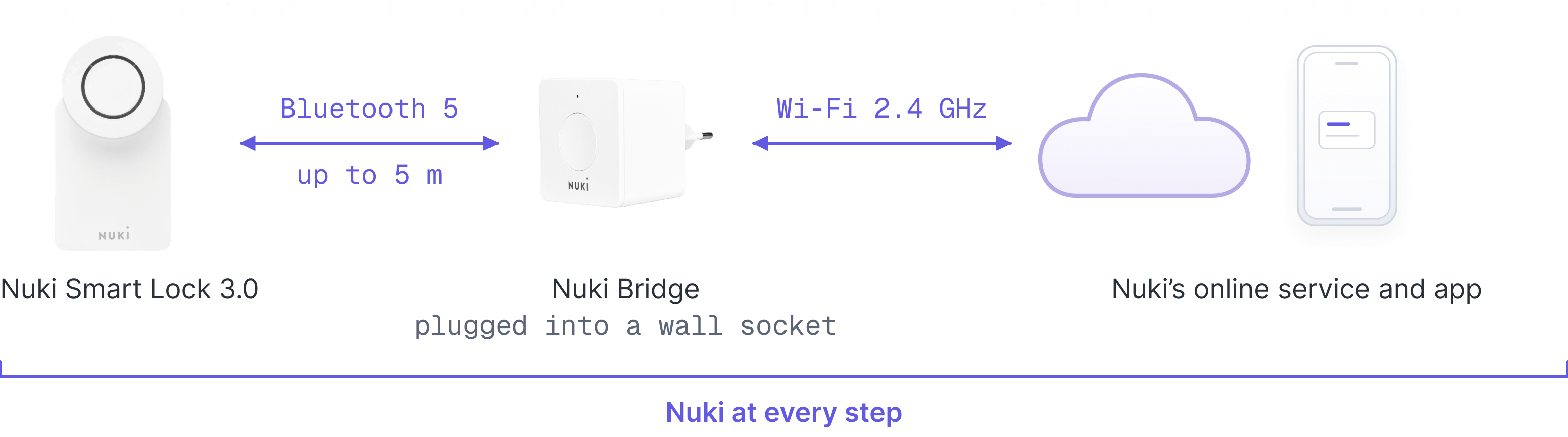
Bridges in DeviceDB
Each one carries its own manufacturer's name, because each only ever talks to that manufacturer's locks and that manufacturer's online service.


A hub speaks a standard, which takes it past any single brand
A speaks the language of a standard rather than that of a brand. SmartThings describes its own as accepting devices "using the Matter, Zigbee, Z-Wave, or LAN protocols", with Edge Drivers acting as the "translator between device-specific protocols" between those radios and the platform's own capability model (SmartThings developer documentation) (→ DeviceDB · SmartThings 3rd Generation Hub).
That is the difference. A bridge relays; a hub reinterprets, into the terms of an ecosystem. The device arrives speaking a standard radio and comes out the other side as an object belonging to somebody else's platform: named by it, automated by it, operated from its app and its account.
Which is why "a hub is just a big bridge" has the relationship backwards. The difference is not how many devices the box gathers, it is the integration the box lets you into. With a bridge, the manufacturer still runs your lock. With a hub, the hub's platform does, and the manufacturer's own app drops to second place or stops featuring in your use of the lock at all.
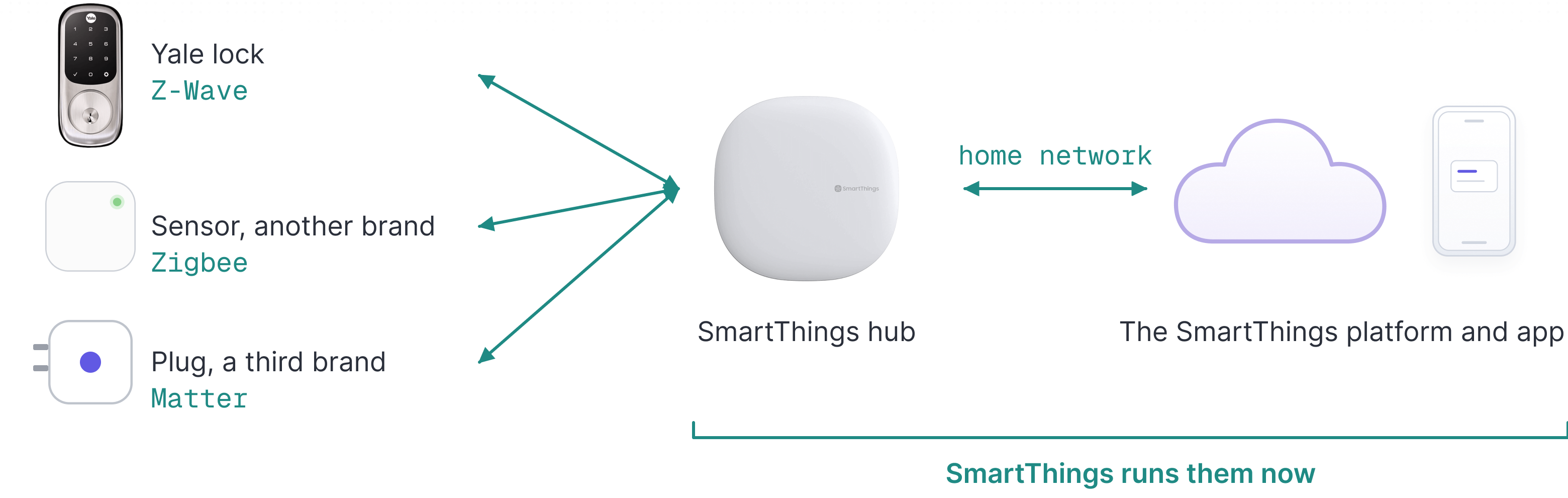
Hubs in DeviceDB
The same SmartThings hardware, sold under two names. Neither is named after the devices it will adopt.


A gateway presents a bounded estate to management software
Gateways are what you install where the doors are no longer a home's but a building's. On the door side, a gateway speaks a short-range radio to the locks, or a wired bus shared by a limited set of doors. On the other side it speaks the building's network, reporting not to a consumer app but to management software, or to a full access control system.
Schlage's GWE2 is a good example. Toward the locks it uses "AES-256 bit encrypted 2.4 GHz Bluetooth 5.1", with a stated range of about ten metres, or up to fifteen when nothing stands between the gateway and the lock. Toward the building it offers a choice: Ethernet powered over the network cable, or an RS-485 port so it can slot into "an existing RS-485 environment", with power drawn from the access control panel. Its purpose is set out in the data sheet: it connects ENGAGE platform devices "in real-time with Physical Access Control Software (PACS) providers", with lock, unlock and lockdown commands executing in under five seconds (GWE2 data sheet) (→ DeviceDB · Schlage Engage Gateway).
That software is not Schlage's. It is the software the operator already runs to manage the badges and doors of the building, whatever brands of lock are on them. That is the whole point of a gateway: it presents one maker's locks to a system that is not that maker's. Allegion says as much in its own way on the same data sheet, where it tells you to check with your own PACS provider that the GWE2 is supported.
Four traits separate this box from a domestic bridge: a capacity limit per box, building power rather than a wall socket, a wired option alongside the radio, and management software at the end of the line rather than an app.
The number of doors a gateway serves is not a marketing figure, it is a technical limit, and it can go down. The GWE accepted up to ten devices; the GWE2 accepts five (GWE2 data sheet).
Moving from one generation to the next still means reworking access control
software. The reason is slight: the new model got an identifier of its own,
gwe2. One character more, and any software that hardcoded gwe, in the
address where it looks up the gateway's firmware for example, has to be
reworked
(Allegion, Gateway IP integration guide).
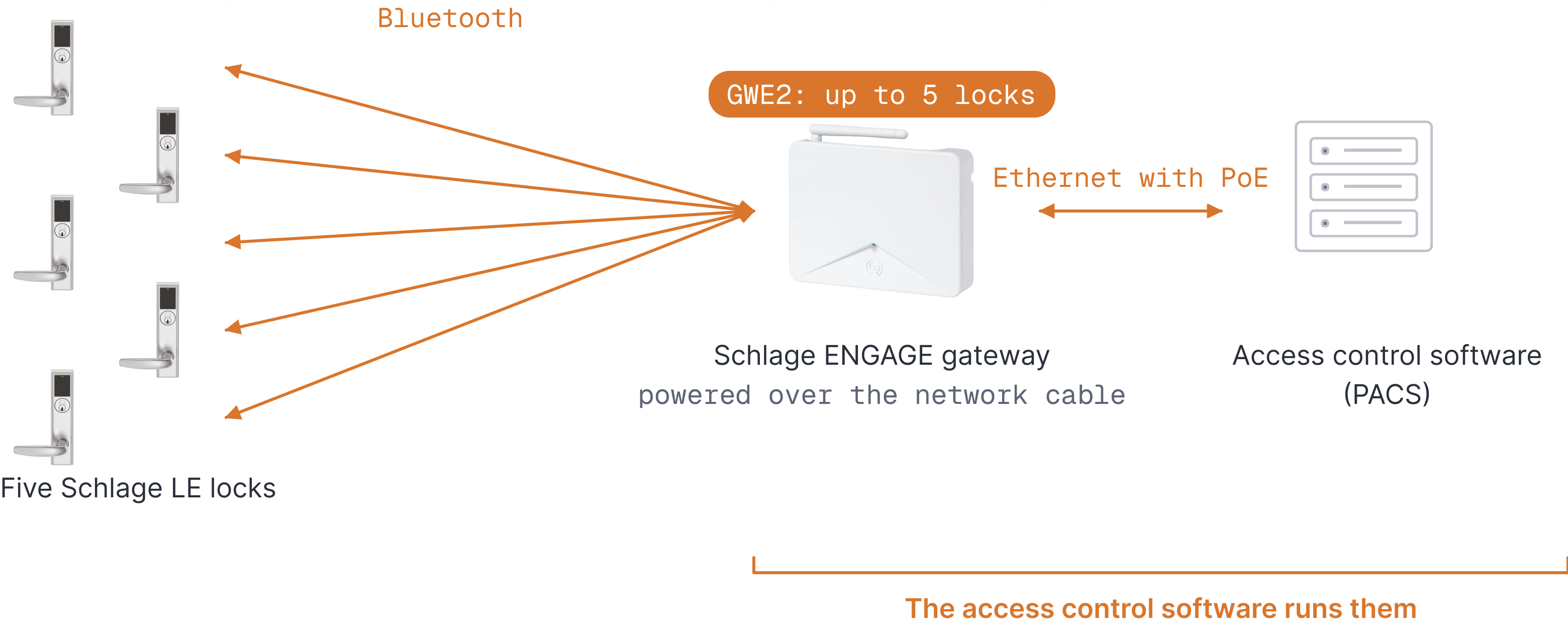
Gateways in DeviceDB
Specified in batches rather than per door: each one presents a bounded number of openings to management software.


Some locks build in Wi-Fi and move the cost into the door
Some locks do build in Wi-Fi directly. These sell well, not least because they spare you buying and installing a box. But they still have to deal with the cost of a permanent link.
Nuki's own range shows both arrangements. The Smart Lock 3.0 cannot reach the internet on its own: it needs the Nuki Bridge (→ DeviceDB · Nuki Smart Lock 3.0, Nuki Bridge). The Smart Lock Ultra carries Wi-Fi and Thread itself, and has given up ordinary cells as a consequence: it holds a single rechargeable lithium-polymer battery, which recharges in two hours (→ DeviceDB · Nuki Smart Lock Ultra (Euro Profile)). Every arrangement has its costs.
August's Wi-Fi Smart Lock runs on two CR123 lithium cells rather than the standard AA cells sold everywhere (→ DeviceDB · August Wi-Fi Smart Lock). A CR123 is a 3-volt lithium photo cell, not a supermarket alkaline, and it costs more to replace.
On duration, manufacturers stay careful. Asked what a charge lasts, Nuki's product page answers "months", noting that it depends heavily on use, door type and locking modes (Smart Lock Ultra product page). Its help centre gives ranges instead: seven to nine months without remote access, five to seven over Thread, four to six over Wi-Fi (Nuki help centre). That is an honest answer, and it is also an admission that there is no single number to give.
So there is no good and bad arrangement as such. The question is who takes on the permanent link and who powers that work. With a separate box, the door lasts a year or two, but you have one more device to power, to place within range and to keep on the network, and it is the one that can bring the system down. With Wi-Fi built in you have a single object to install, but the burden of holding the link moves onto that object.
Where the power is paid
The Smart Lock 3.0 is filed as hub required and pairs with the Nuki Bridge. The Smart Lock Ultra carries Wi-Fi and Thread and a rechargeable lithium-polymer battery. The August Wi-Fi Smart Lock carries Wi-Fi and two CR123 cells.


In short
A small card for telling these devices apart. Ask yourself:
Which protocol is on each side?
If it is the same brand on both sides, it is a bridge.
If devices are managed under a public standard, it is a hub.
If a short-range or wired link gathers devices into a fixed estate inside a building's network, it is a gateway.
Which online service drives the devices?
If it is the device manufacturer's, it is a bridge.
If it is the platform's, you are dealing with a hub.
If it is access control software, it is a gateway.
In practice: Nuki's bridge talks Bluetooth to a Nuki device and Wi-Fi to Nuki's server. SmartThings' hub talks Zigbee, Z-Wave or Matter to several brands, and serves the SmartThings platform. Schlage's GWE2 talks Bluetooth to a fixed set of Schlage locks, and Ethernet to management software.
| Bridge | Hub | Gateway | |
|---|---|---|---|
| Protocol on the device side | One brand's proprietary radio | A public standard: Zigbee, Z-Wave, Matter | A short-range radio or a wired bus, to a fixed estate |
| Protocol on the network side | The home's Wi-Fi | The home's local network | The building's network, often Ethernet powered over the cable |
| Online service served | The device manufacturer's | The platform's | The access control software |
| What the device becomes | The same device, reachable from further away | An object of the platform, named and automated by it | One door among those of a managed estate |
| Who answers when it fails | The lock manufacturer | The platform | The integrator or the software vendor |
The hub column is where the device changes owner on the way through: it goes in speaking a standard and comes out an object of a platform.