English
Native or missing features and fundamental API limitations: an example with lock codes
When a lock cannot make a code expire, who takes care of programming it and then deleting it, and what happens when the lock does not respond? This article explores one of many examples of the limits of manufacturer APIs, and of how their behavior can be adapted.
Imagine a traveler who books a stay on a short-term rental platform, arrives on Friday at 4 p.m. and leaves on Sunday at 11 a.m. Their host, as you would expect, ideally wants to give them an access code that works for the whole stay and only for the stay, which means a code that works from the moment they arrive and stops working afterwards. Some manufacturer APIs, provided they are used with certain locks, can do this natively. You give them the code and two dates, and the locks handle that window of authorization with their own clock (give or take a few inaccuracies, which we explain in detail in this article).
For the lock to handle that date range itself, two conditions have to be met. The manufacturer's API has to accept a code accompanied by a start date and an end date. And the lock has to be able to store those two dates alongside the code and compare them with its clock. If either condition is missing, the lock cannot handle the time window on its own. It then receives the code without any date (either because the system itself could not send the dates, or because the lock cannot store them), and as far as the lock is concerned, the code stays valid until it receives an order to delete it. In that case, some software has to send the code to the lock on Friday (without dates, a code sent a week early starts working a week early) and send it the order to delete it on Sunday.
When the host's software goes through Seam, our servers take care of that upkeep. This work is part of what we at Seam call the "synthetic layer," a layer we place on top of every API we integrate, to pull them up and bring them to capabilities they do not always have in common. Here we briefly describe what we do with the scheduling of access codes.
As for the headache of the upkeep that unifies all those APIs, we have another name for it: "manufacturer API hell," on the same footing as the traps between the software and the door and API versions that pile up.
On a lock that cannot receive dates, our servers send the code shortly before arrival and delete it at departure
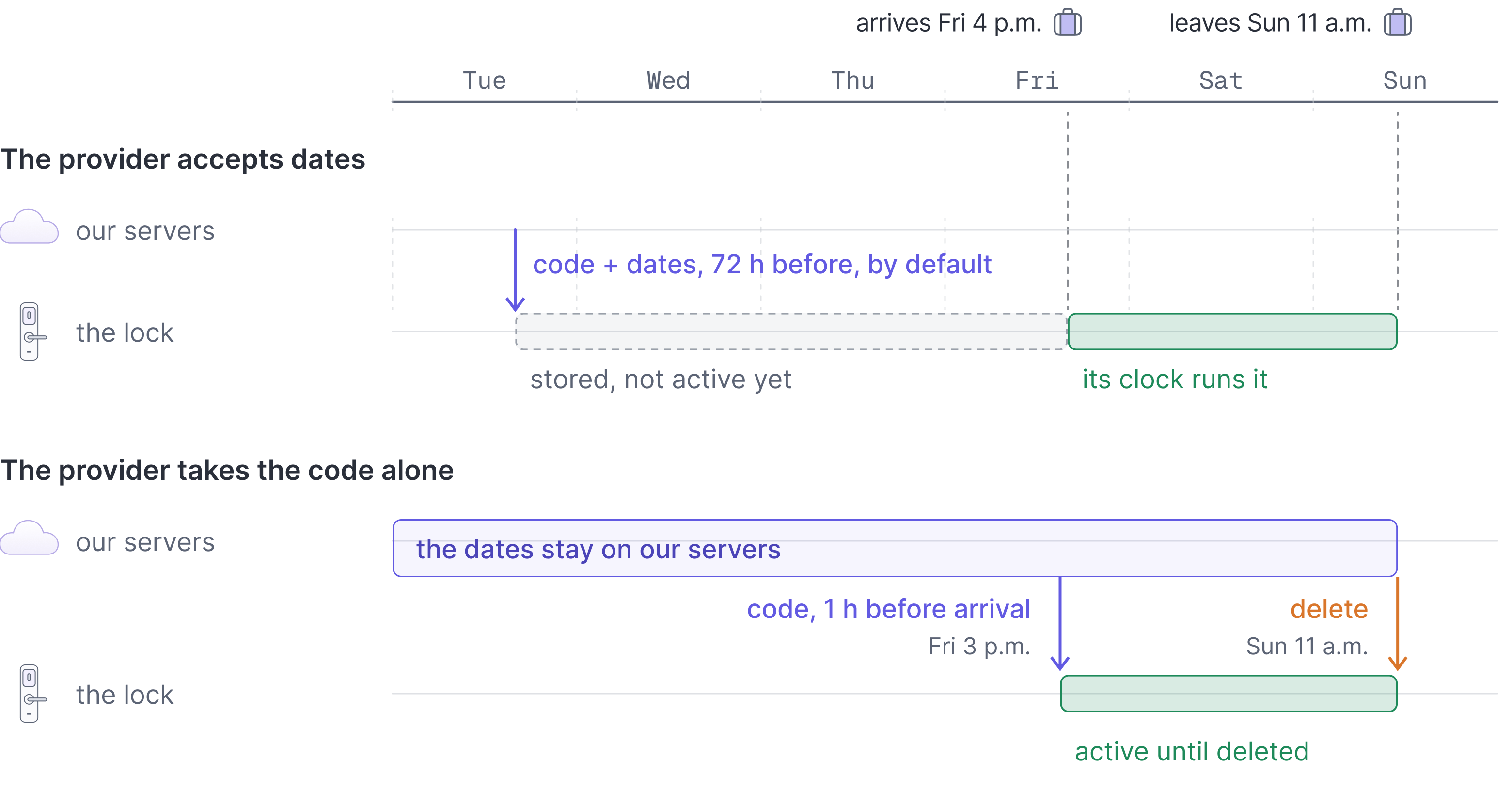
Our documentation lists the , meaning the manufacturers' software platforms, with which we can send a code along with a date range (Seam, access codes). We call this native scheduling. With these providers, our servers send the code and its two dates to the lock 72 hours before the arrival time, by default, which leaves a safety margin (in case of a connectivity problem, in which case we keep retrying afterwards). The lock then activates the code at the start of the defined range (often a little before, as we explain in this other article) and keeps it active until the end time (a little after, there too). These mechanisms are those of our access codes API, which our documentation describes as a low-level API; to grant access to a person, it recommends Access Grants (Seam, access codes).
Why don't we send it even earlier, when we could? Simply because a code sent early already takes up a memory slot in the lock, and on these locks there is always a maximum number of codes that can be stored ahead of time (Seam, access code requirements for door locks).
With the other providers, the two dates of a scheduled range stay on our servers, since there is no way to send them. As our documentation explains, our servers send the code to the lock 60 minutes before the arrival time, to make it active. At the departure time, we send a new order to delete the code, which from then on has to stop working (Seam, access codes).
This list is kept by provider, not by lock model (Seam, access codes). A lock can use a radio protocol that is able to carry schedules without the platform that controls it sending them. The same home automation platform can also send access schedules to its Matter locks but not to its Z-Wave locks. We explain that oddity in this article.
In both cases, our API shows at every moment what stage the code is at. It can be waiting to be sent, being sent, stored on the lock but not yet active, active, or being deleted (Seam, lifecycle of access codes).
For a code to start and stop working at the right local time, we also need to
know the lock's time zone, which unfortunately is not always possible. The
problem case is the clock change, which shifts local time by one hour relative
to universal time. If a code's validity period overlaps a switch to or from
daylight saving time in at least one of the time zones the lock could be in,
we add an hour of margin. That hour extends the end of the period in spring
and the start of the period in fall. The code thus stays valid through the
clock change, but it may keep working one hour longer than intended. Our API
flags this with the time_frame_adjusted_for_unknown_time_zone warning, and
the margin disappears as soon as the lock's time zone is set (Seam, access
code errors and warnings).
Every lock has its own code rules, and our API publishes them so they can be followed
Keypad locks do not accept just any code. For each of these devices, our API publishes the accepted code lengths, the maximum number of codes that can be stored at the same time, and the list of rules the code has to follow. We have recorded twelve rules of this kind (Seam, access code requirements for door locks). Some locks, for example, refuse any code that contains a zero. Others refuse codes that start with 12. Others still refuse ascending sequences like 1234 or descending ones like 9876, codes made of a single repeated digit, or codes that do not contain at least three distinct digits. Some cylinder locks, it is worth remembering, only have the keys 1 to 6 on their keypad, and so refuse any code that contains a 0, a 7, an 8 or a 9. Finally, with some kinds of locks, it is not the host's software that generates the code but the manufacturer's platform, on its own. If the lock accepts a code supplied to it but the host does not supply one, we generate one, at the length the host prefers, provided the lock accepts codes of that length (Seam, creating access codes).
And that is not the end of it, because the name used to label the code has its own rules too. Depending on the manufacturer, it may have to be of a specific length or be unique. Some have to be split into two values, first name and last name (the idea being to tie them to the name of their user).
To avoid getting stuck, our API can shorten the string or add characters to it, and returns, in a separate field, the name as it appears in the manufacturer's app or on the lock, so that the host can easily find the code they created (Seam, access codes).
Because these rules are spelled out, software using the Seam API can check that a code is usable before sending it, and avoid one of the traps that can make it malfunction (Seam, access code requirements for door locks).
The manufacturer's app can change the code, and our servers reprogram it unless the host has allowed the change
Lock owners usually keep using the manufacturer's own app, which also communicates with the locks and can make changes to them at the same time as our servers. They can change the digits of a code we programmed, change its dates, or even delete it. From then on, the code stored on the lock no longer matches the code our API describes.
By default, our servers reprogram the lock so that the code matches the one
our API describes again, including when the code was deleted, and they keep
doing so until the code's end date. Our API then sends the
access_code.modified_external_to_seam event and attaches an error to the
code (Seam, access
codes). Our
documentation advises warning users about this behavior, because it can
surprise them, and checking whether another integration connected to the lock
is changing the codes (Seam, troubleshooting access
codes).
The host can turn this behavior off, code by code, when creating the code. Our servers then stop reprogramming the lock, and our API attaches a warning to the code instead of an error (Seam, access codes).
Our servers keep trying to reach locks that could not be reached, and backup codes take over
Battery-powered locks keep their radio asleep most of the time, and the Wi-Fi connection or the linking them to the internet can also drop. No software can force an unreachable lock to receive an order. Offline codes get around the problem differently: the lock receives nothing, and computes for itself the code that the platform computed on its side (we explain how that works in this article).
When a lock can store a code's start and end dates itself, our servers send them three days before arrival, as we saw above. If a send fails, our API reports it right away in the code's details, as an error or a warning, so the host finds out three days before the traveler arrives, not on the day itself, which gives them time to act (Seam, troubleshooting access codes).
If the code is still not stored on the lock as the arrival time approaches,
our API attaches the delay_in_issuing warning to the code, and our servers
keep trying (Seam, lifecycle of access
codes).
If the arrival time passes without the code being stored, our API attaches the
failed_to_issue error to the code, because the traveler may find the door
locked. Our servers keep trying all the same, in case the error was temporary,
and clear the error as soon as an attempt succeeds (Seam, troubleshooting
access
codes).
A warning does not open the door for the traveler, though. To handle these cases, we always recommend storing a set of backup codes on the lock in advance, which can be handed out in an emergency when a code could not be programmed (Seam, access codes). On the locks that allow it, we maintain that pool. When the host turns it on, our servers store these extra codes on the lock, in addition to the regular ones. When a regular code runs into trouble, for example because of an intermittent connection, a manual deletion made directly on the lock or in the manufacturer's app, or an outage of the manufacturer's own service, a backup code can be requested from our API and given straight to the traveler. The backup code's end date can then be aligned with that of the original code. In the manufacturer's app, backup codes appear under the name "Backup," followed by the code's identifier and the label "(Seam)" (Seam, backup access codes).
Backup codes are only offered for temporary codes, such as the ones given to
travelers. Permanent codes, which have no end date, cannot be replaced by
backup codes. Since the backup pool is not bottomless, if it ever runs dry,
our API flags the lock with the empty_backup_access_code_pool error (Seam,
backup access
codes).
Codes left in the lock after departure are flagged, and we keep trying to delete them
Locks that receive a code and its validity range keep it active until the end time, based on their own clock. For locks that can only store the code itself, the code stops being valid through a deletion that our servers carry out as soon as the end date has passed (Seam, access codes). The consequence is that if the lock cannot be reached when that order is sent, the code stays stored in it, and still opens the door.
Our API then attaches the failed_to_delete error to the code, meaning the
code is still active on the lock after its end date and the traveler can still
get in. Our servers keep trying to delete the code until they succeed, and we
recommend relying on this notification to warn the lock's owner (Seam,
lifecycle of access
codes).
No software can delete a code on a lock it cannot reach. This is also why the
time it takes to revoke access varies so
widely, depending on how the system reaches
the lock.
Another edge case: if the account linking the host to the manufacturer's service is disconnected, or if the lock itself has been removed, our servers can no longer check what the lock contains. In that case, our API shows the code's state as unknown (Seam, lifecycle of access codes).
| What the manufacturer's API and the lock do | What our servers add | What stays out of reach | |
|---|---|---|---|
| The code's dates | With native scheduling, the lock receives the code and its dates and applies them itself. Otherwise, it receives the code alone | The code sent shortly before arrival, the delete order sent at departure, an hour of margin if the time zone is unknown | A lock that does not receive the delete order |
| The code's rules | Lengths, a maximum number of codes, rules specific to the manufacturer or the model | The list of rules published for each lock | Locks on which the host's software cannot supply a code |
| The code changed in the app | The manufacturer's app changes or deletes the code | The code reprogrammed until its end date, or the change kept if the host has allowed it | The choice between the two behaviors, which is the host's |
| The unreachable lock | Radio asleep, Wi-Fi or bridge down | Sending started in advance, retries, an alert before arrival, backup codes already stored | Forcing the lock to receive an order |
| The end of the stay | With native scheduling, the lock deactivates the code. Otherwise, nothing | The delete order, resent until it gets through | A code that still opens the door until the delete order arrives |
The third column describes our servers' work. The last one depends on the lock and its connection, and no software makes it go away.
Software that talks directly to manufacturer APIs has to build each of these mechanisms itself, and they are only a few examples among the other things we do in the background to improve the quality of the service. That means knowing which manufacturers accept dates with a code, sending and deleting codes on time for the others, keeping track of the code rules for each model, reacting to changes made in the manufacturers' apps, retrying for as long as the lock does not respond, and maintaining a pool of backup codes.