English
Pushbutton or touchscreen keypad: does it really matter?
Same digits, same door, same lock behind. And yet the two keypads are not used in the same conditions and do not fail in the same way.
Two locks side by side in a catalog. Same brand, same , same radio, same app. The only visible difference: one carries twelve buttons, the other a sheet of glass that lights up with digits. So you choose on looks, the way you choose between brass and nickel, and there is nothing wrong with that: the face of a lock is the only part you look at every day.
But the decision can also be reasoned, because the two keypads do not render the same service, and depending on where the door is, who goes through it, at what hour and in what weather, what matters most can change. In some cases the choice is forced outright, by constraints that one or the other kind of keypad cannot meet.
A pushbutton keypad responds to force, a touchscreen to a bare finger
A pushbutton keypad is a grid of switches: each press closes a contact. What triggers it is force, and force passes through a glove, in the rain, in the dark. As long as no button is pressed, the electronics can stay asleep.
A touchscreen keypad is a capacitive sensor underneath a sheet of glass. What triggers it is not force but the electrical presence of a bare finger. Nothing moves, so no switch wears out and the surface wipes clean. In exchange it usually needs a bare finger, a reasonably dry sheet of glass, and a sensor that is powered, or woken, before it reads anything.
So it is worth asking what the real use will be, day in and day out, before choosing.
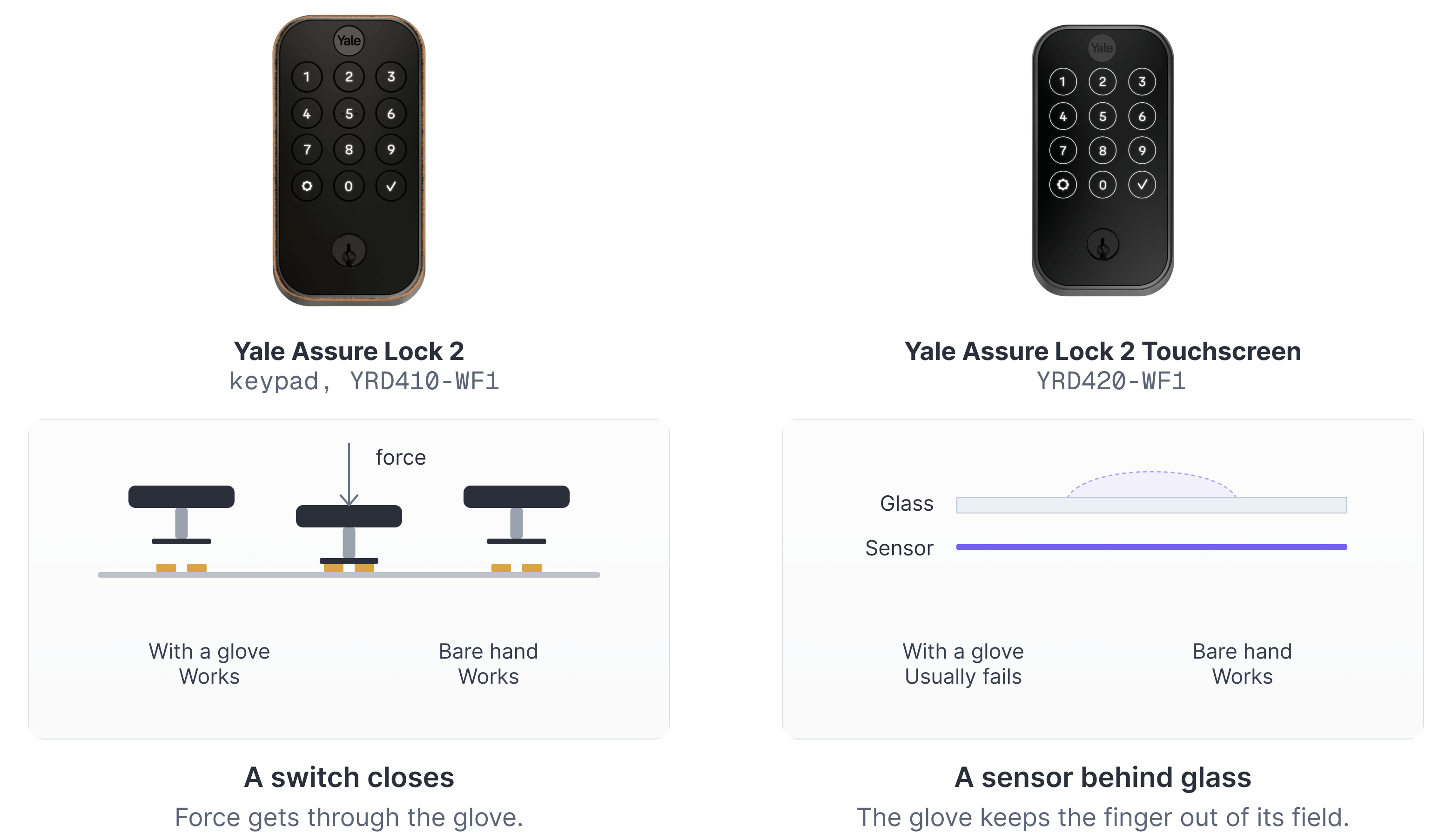
At a plant room door, a touchscreen can be unusable
Take the door of a plant room, a boiler room or a bin store. The people who go through it wear gloves, often thick ones, sometimes wet, and their hands are full. If the control surface is a sheet of glass, each of them has to pull a glove off, tuck it under an arm, key the code, put the glove back on.
Is that a detail? Not really. Beyond the nuisance of it, what matters is what follows. People always find solutions to the problems they meet, and here the solution is a simple one: the door ends up wedged open, to save unlocking it on every trip. And with that, security is gone. Any unauthorized visitor can walk in too, as long as they do it quietly.
An unpleasant keypad does not produce patient users. It produces workarounds, and those workarounds reduce the security mechanism to nothing.
On doors like these, choosing a pushbutton keypad over a touchscreen is not a matter of taste. It is what will keep the door actually shut.
A touchscreen lights up, which helps in some cases and not in others
In the dark, at first sight, the touchscreen is the better choice, because it lights up and lets you read the digits, where a pushbutton keypad with no backlight makes you hunt for them with a finger.
Light, though, only solves a problem of visibility. For a blind person, a lit screen brings nothing: it is still a smooth surface where nothing distinguishes the 1 from the 7, where nothing says the press was registered, and where the models that wait for a wake gesture do not even offer a starting point. A button, on the other hand, is found by finger. It stands in relief, separate from its neighbors, and it answers with a click that confirms.
On the door of an apartment building, a residence or a building open to the public, accessibility becomes a question in its own right, and it is often what decides in favor of a mechanical solution.
Four polished keys give away the four digits of the code
Change the setting once more. A residence bike store, or a staff entrance in a shop: the same code has served thirty people for three years. The four keys of that code polish, and anyone standing at the door can spot which ones.
The problem is plain: a four-digit offers ten thousand combinations to somebody who knows nothing. Once you know which four digits are used, and that they are all different, twenty-four combinations remain. Twenty-four attempts are made by hand, at the door, with no tool. A touchscreen may then be preferable, though glass keeps fingerprints, and some makers have it display random digits to press before the code so that every digit carries one.
Conversely, in a short-term rental the code changes with every stay: wear never has time to point at anything, and that advantage of the touchscreen is of no use at all.
So it is the use that decides, not the hardware.
| Pushbutton keypad | Touchscreen keypad | |
|---|---|---|
| What registers the press | A switch closing | A capacitive sensor behind glass |
| Gloves and wet hands | Works by force, a glove gets through | A bare finger is usually required, and reasonably dry glass |
| In the dark | It needs a backlight, otherwise you hunt by finger | Lights up and offers the digits to read |
| Without any sight at all | The keys are found in relief, the press clicks | No landmark under the finger, unless the maker adds one |
| What wears | The four digits of the code, visibly, over the years | Nothing mechanical, the surface wipes clean |
| What it takes to notice you | Nothing, until a button is pressed | A powered sensor, or one that has been woken |
| How it fails | A switch dies after years of clicks | The sensor or its wake logic misreads |
None of these rows settles the matter between the two keypads in the abstract. Each one names a kind of door on which one of them becomes the right choice.
The pair, in DeviceDB
One product family, two keypad types, two models under two names, from the manufacturer's own catalog.


The same rule, elsewhere
The word touchscreen appears in the product's own name, at other manufacturers.


All of this is why manufacturers, more often than not, sell the two versions under two distinct names rather than as two finishes. DeviceDB does the same and lists two distinct models each time: the difference is not a matter of dress, it is a matter of use.