

Set Up Noise Thresholds
For Minut, list existing thresholds first. Ifbuiltin_quiet_hours already exists, update it instead of creating another quiet-hours threshold.
Create a threshold using the Create a Noise Threshold endpoint. For example:
Request:
Best Practices
- For Minut devices, you can configure two thresholds—one for quiet hours and one for the rest of the day.
- For NoiseAware devices, you can configure as many thresholds as you want, provided that they do not overlap during daytime hours.
Set Up Webhooks
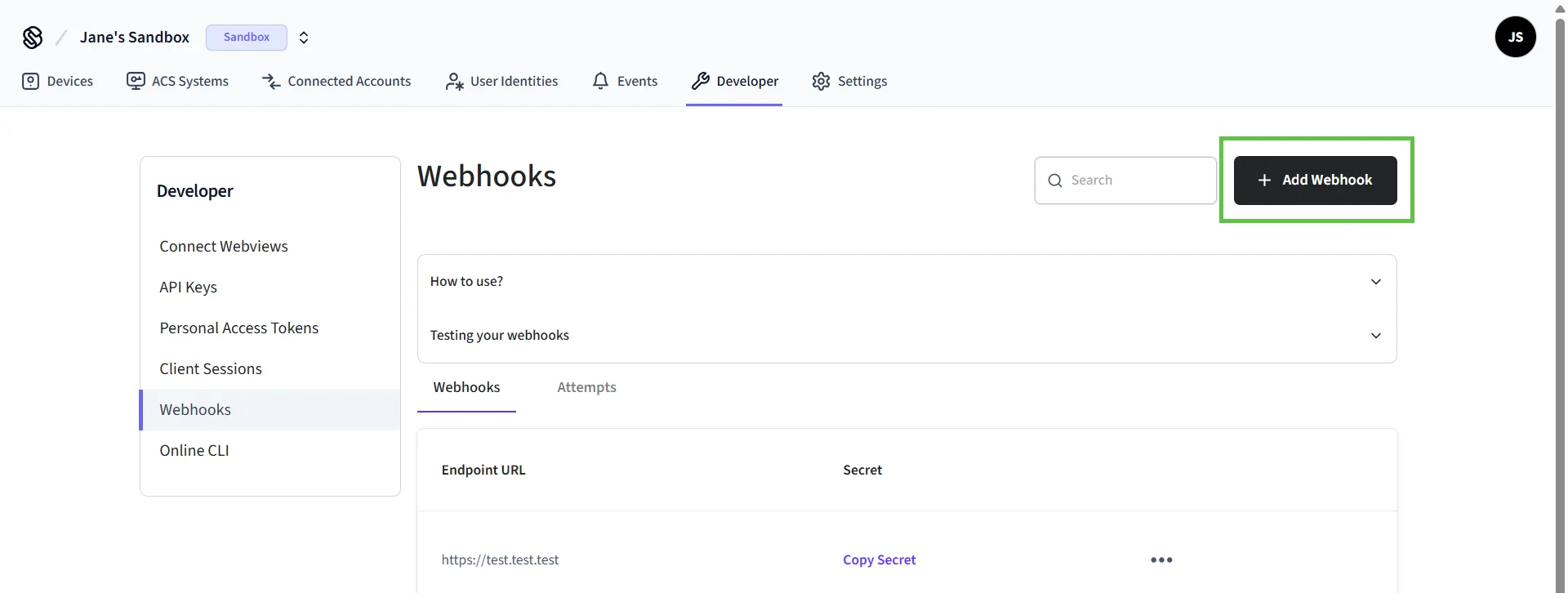
You can set up webhooks in the Seam Console.- In the left-hand navigation pane of Seam Console, click Webhooks.
-
On the Webhooks page, click + Add Webhook.
-
In the Create Webhook dialog:
- Type your URL.
- Select the event types for which you want to receive events.
- Click Create.
Monitor Events
Subscribe tonoise_sensor.noise_threshold_triggered. The signed event includes event_id, workspace_id, device_id and occurred_at; read it from the verified webhook payload. Do not treat an entry in the event list alone as proof that your application received it.
For a detailed reference of event parameters, see Events.
For a receiver that verifies signatures and stores one alert per event across restarts, continue with Receive and store an alert.
In a sandbox workspace, simulate a threshold event to test the receiving path. This does not test acoustic detection on a physical sensor.