

- Device debugging flows that allow your customers to uncover issues
- Responsive design to fit seamlessly on any screen size
Getting started with Components ->
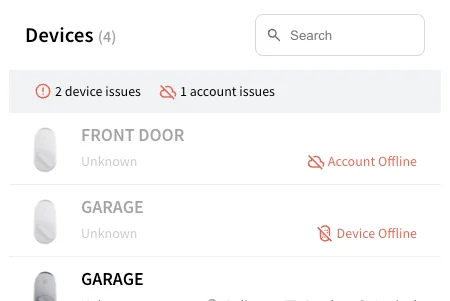
Device TableDisplay a list of devices, and filter for all the devices with issues.
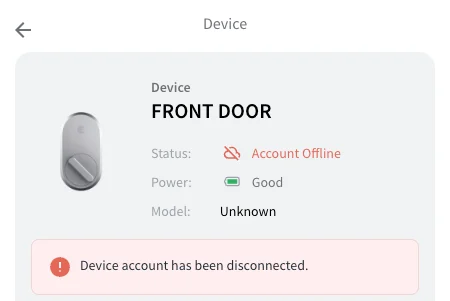
Device Details
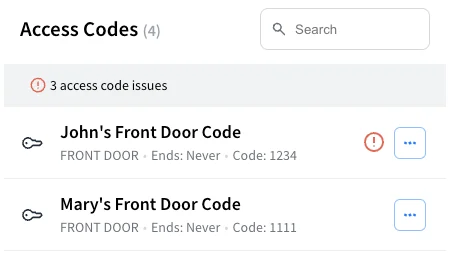
Access Code TableDisplay a list of access codes, and filter for all the access codes with issues.
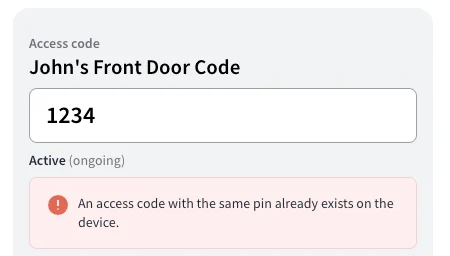
Access Code Details
Ecosystem Components
Ecosystem Components show the apps and devices that work with Seam on your own website, such as a manufacturer’s product page or an app’s integrations page. They use an embed key instead of a publishable key and do not need a Seam workspace.Compatible Apps
List the apps that work with a device category, manufacturer, provider, or capability through Seam.
Supported Devices
List the device models that work with Seam, with capability badges, search, and filters.
Next Steps
- Minimal sample apps running Seam Components in various frameworks.
- View our Getting Started Guide
- View and play with other components in the interactive storybook component library
- Check out some Full Example Apps