> ## Documentation Index
> Fetch the complete documentation index at: https://www.seam.co/docs/llms.txt
> Use this file to discover all available pages before exploring further.
# Configuring Noise Threshold Settings
> Learn how to configure noise thresholds for noise sensors.
Create or update a noise threshold, then verify that its event reaches your application.
## Set Up Noise Thresholds
For Minut, [list existing thresholds](/docs/api/noise_sensors/noise_thresholds/list) first. If `builtin_quiet_hours` already exists, [update it](/docs/api/noise_sensors/noise_thresholds/update) instead of creating another quiet-hours threshold.
Create a threshold using the [Create a Noise Threshold](/docs/api/noise_sensors/noise_thresholds/create) endpoint. For example:
**Request:**
```javascript JavaScript theme={"dark"}
const deviceId = '98dc7c66-045d-49cb-a62b-4bb431b0a9fa'
const noiseThreshold = await seam.noiseSensors.noiseThresholds.create({
device_id: deviceId,
starts_daily_at: '20:00:00[America/Los_Angeles]',
ends_daily_at: '06:00:00[America/Los_Angeles]',
noise_threshold_decibels: 70,
})
console.log(noiseThreshold)
```
```bash cURL theme={"dark"}
curl -X 'POST' \
'https://connect.getseam.com/noise_sensors/noise_thresholds/create' \
-H 'accept: application/json' \
-H "Authorization: Bearer ${SEAM_API_KEY}" \
-H 'Content-Type: application/json' \
-d '{
"device_id": "98dc7c66-045d-49cb-a62b-4bb431b0a9fa",
"starts_daily_at": "20:00:00[America/Los_Angeles]",
"ends_daily_at": "06:00:00[America/Los_Angeles]",
"noise_threshold_decibels": 70
}'
```
```python Python theme={"dark"}
device_id = "98dc7c66-045d-49cb-a62b-4bb431b0a9fa"
noise_threshold = seam.noise_sensors.noise_thresholds.create(
device_id = device_id,
starts_daily_at = "20:00:00[America/Los_Angeles]",
ends_daily_at = "06:00:00[America/Los_Angeles]",
noise_threshold_decibels = 70
)
pprint(noise_threshold)
```
```csharp C# theme={"dark"}
var deviceId = "98dc7c66-045d-49cb-a62b-4bb431b0a9fa";
var noiseThresholdAttempt = seam.NoiseThresholdsNoiseSensors.Create(
deviceId: deviceId,
startsDailyAt: "20:00:00[America/Los_Angeles]",
endsDailyAt: "06:00:00[America/Los_Angeles]",
noiseThresholdDecibels: 70
);
Type t = noiseThresholdAttempt.GetType();
PropertyInfo[] props = t.GetProperties();
foreach (var prop in props)
{
Console.WriteLine(prop.Name + ": " + prop.GetValue(noiseThresholdAttempt));
}
```
The JavaScript SDK returns the created noise threshold. The HTTP response also includes an action attempt. See the [current response schema](/docs/api/noise_sensors/noise_thresholds/create) and confirm the threshold with [List Noise Thresholds](/docs/api/noise_sensors/noise_thresholds/list).
The example sets a 70-decibel threshold from 20:00 to 06:00 in America/Los\_Angeles, including daylight saving changes.
Once you have created a threshold, connect it to a webhook to log events.
### Best Practices
* For Minut devices, you can configure two thresholds—one for quiet hours and one for the rest of the day.
* For NoiseAware devices, you can configure as many thresholds as you want, provided that they do not overlap during daytime hours.
## Set Up Webhooks
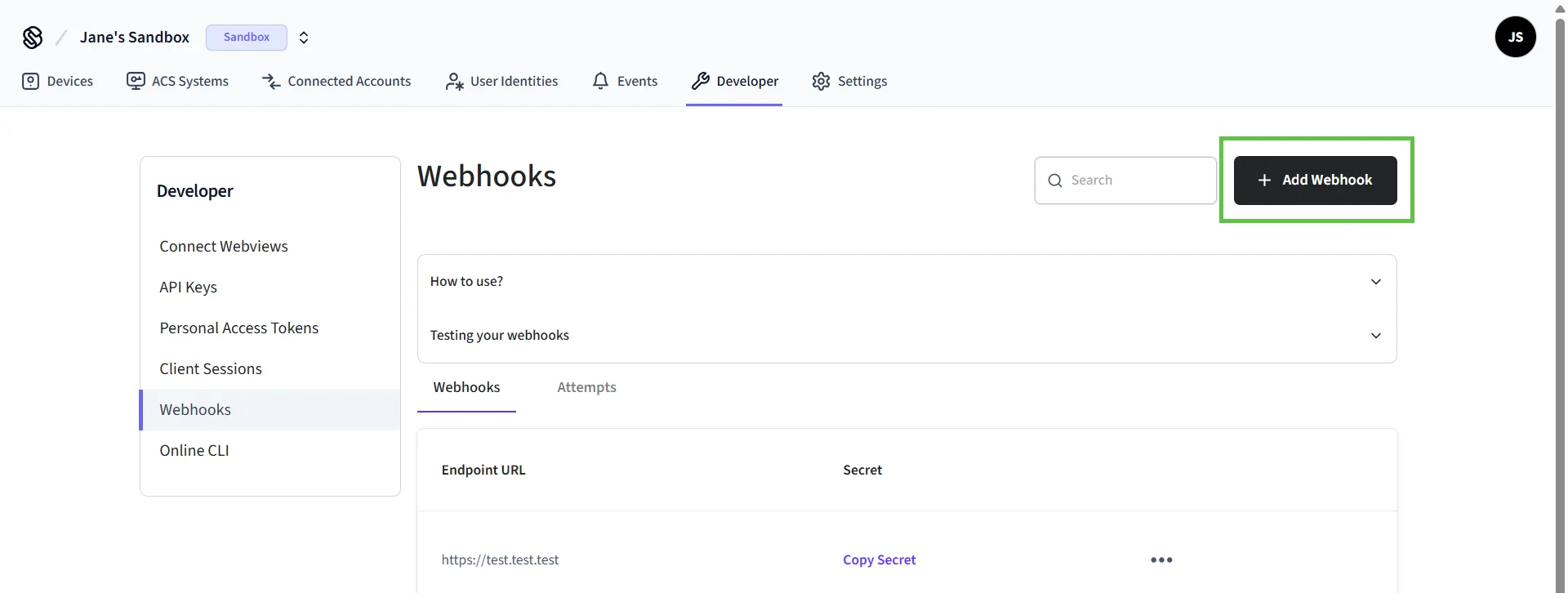
You can set up webhooks in the [Seam Console](https://console.seam.co).
1. In the left-hand navigation pane of Seam Console, click **Webhooks**.
2. On the **Webhooks** page, click **+ Add Webhook**.
 3. In the **Create Webhook** dialog:
1. Type your URL.
2. Select the event types for which you want to receive events.
3. Click **Create**.
The Seam Console displays the URL and secret for the newly-created webhook. To test your webhook, click **Test your webhook**.
## Monitor Events
Subscribe to `noise_sensor.noise_threshold_triggered`. The signed event includes `event_id`, `workspace_id`, `device_id` and `occurred_at`; read it from the verified webhook payload. Do not treat an entry in the event list alone as proof that your application received it.
For a detailed reference of event parameters, see [Events](/docs/api/noise_sensors/noise_thresholds/events).
For a receiver that verifies signatures and stores one alert per event across restarts, continue with [Receive and store an alert](/docs/capability-guides/noise-sensors#receive-and-store-an-alert).
In a sandbox workspace, [simulate a threshold event](/docs/api/noise_sensors/simulate/trigger_noise_threshold) to test the receiving path. This does not test acoustic detection on a physical sensor.
3. In the **Create Webhook** dialog:
1. Type your URL.
2. Select the event types for which you want to receive events.
3. Click **Create**.
The Seam Console displays the URL and secret for the newly-created webhook. To test your webhook, click **Test your webhook**.
## Monitor Events
Subscribe to `noise_sensor.noise_threshold_triggered`. The signed event includes `event_id`, `workspace_id`, `device_id` and `occurred_at`; read it from the verified webhook payload. Do not treat an entry in the event list alone as proof that your application received it.
For a detailed reference of event parameters, see [Events](/docs/api/noise_sensors/noise_thresholds/events).
For a receiver that verifies signatures and stores one alert per event across restarts, continue with [Receive and store an alert](/docs/capability-guides/noise-sensors#receive-and-store-an-alert).
In a sandbox workspace, [simulate a threshold event](/docs/api/noise_sensors/simulate/trigger_noise_threshold) to test the receiving path. This does not test acoustic detection on a physical sensor.